-
[read more]
PowervRO aims to simplify interacting with vRO from the command line by providing a library of functions to help you do things like execute workflows and actions or import resources.
Release 1.0.0 includes 59 functions covering a number of services exposed by the API. Currently we support:
- Actions-service
- Category-service
- Packages-service
- Plugin-service
- Resource-service
- Service-descriptor-service
- User-service
- Workflow-run-service
- Workflow-service
If you would like to see support for something that isn’t listed above let us know over at Github or fork us and submit your own functions.
-
[read more]
One of the current limitations with vRA7 is that once a local user has been created it can’t be modified.
Since v1.20 PowervRA has provided ability to interact with local user principals by using the following set of functions:
- Get-vRAUserPrincipal
- Set-vRAUserPrincipal
- New-vRAUserPrincipal
- Remove-vRAUserPrincipal
-
[read more]
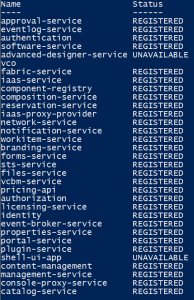
While working in a vRA 7.0.1 environment recently I came across an interesting issue where some core services were not behaving the way they should. The vco service seemed to be unregistered and shell-ui-app along with advanced-designer-service were showing as UNAVAILABLE.
-
[read more]
So recently I read about Let’s Encrypt. It’s a pretty awesome service that provides free short-lived SSL certificates.
I thought it would be cool to share the steps I took to get my WordPress installation running Ubuntu/Apache set up with fresh SSL certificates and automated renewal.
-
[read more]
Requesting a vRA catalog item is simple with PowervRA and can be achieved with the Request-vRAConsumerCatalogItem cmdlet. Here are a few examples using an imaginary catalog item called centos.