-
[read more]
After deleting the Search Service Application that got created by running the Farm Configuration Wizard I noticed that there were still some timer jobs relating the application left over. It’s always good to keep on top of your infrastructure housekeeping, no matter how small the element is.
-
[read more]
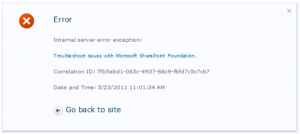
After provisioning my Enterprise Search Center, setting my content sources and performing the initial crawls I couldn’t seem to actually produce any results from a query and kept getting an “Internal Server Error Exception” message (Bellow).
-
[read more]
After having some issues with the Search Service Application that is created when you run the SharePoint 2010 Farm Configuration wizard I decided to delete it and manually configure my own Search Service app (conforming to M$ best practices). To my annoyance after creating the Service Application and clicking in to configure it I got the following error message:
“The Search Service is not able to connect to the machine that hosts the administration components”
-
[read more]
For those still using Windows XP here is a nice script that I used to use in a previous life to remove the masses of local profiles collected on our systems.
Obviously now with Windows Vista and 7 (in an enterprise environment) you can just set the GPO “Computer Configuration/Administrative Templates/System/User Profiles/Delete user profiles older than a specified number of days on system restart”. Which makes all of our lives easier…

Here’s the script anyway - I ran this locally on each machine but it can easily be deployed via GPO. Just make sure you are wise about when you deploy it as it could take a lot of time to process (depending on how many local profiles are on the system) and delay your users Logon experience.
-
[read more]
It looks like I’ve been on a bit of a PowerShell trip this week (ha?) - I needed to quickly create about 50 temporary users so decided to push my old CreateUsers.VBS to one side and have a look at what PowerShell can do for me. After reading a few articles I came across this Blog by a guy called Josh Twist and his post on creating user accounts in PowerShell (which was exactly what I was looking for).